

Implement iOS Beauty
Add SDK Dependency
Method A: CocoaPods Integration (Recommended)
Add the Facebetter dependency to your project's Podfile:
target 'YourTargetName' do
  # Please replace with the latest version
  pod 'Facebetter', '1.2.2'
end
Run the installation command:
pod installXcode 15+ Compilation Error Handling
If you are using Xcode 15 or later, you might encounter a Sandbox: rsync.samba deny(1) error during compilation. This is caused by Xcode's default User Script Sandboxing being enabled.
Solution:
- Select your Project in Xcode.
- Navigate to the Build Settings tab.
- Search for
ENABLE_USER_SCRIPT_SANDBOXING. - Change its value from
YestoNo.
Method B: Manual Framework Integration
Go to the Download page to get the latest SDK, then extract it.
Copy the Facebetter.framework library from the SDK package to your project path.
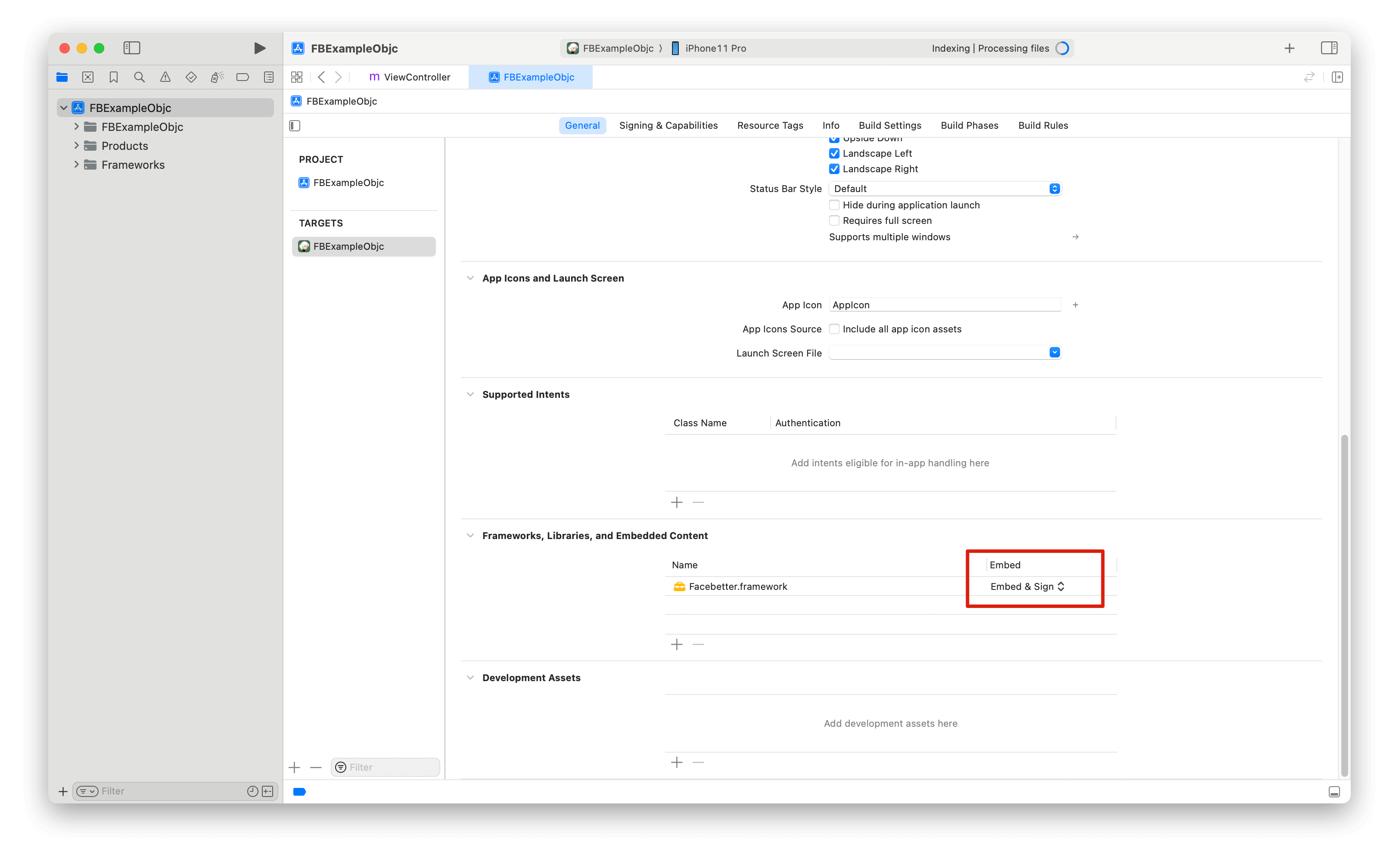
Open Xcode and refer to this guide to add the Facebetter.framework dynamic library. Make sure the Embed property of the added dynamic library is set to Embed & Sign.
Permission Configuration
Add necessary permissions in Info.plist:
<!-- Camera permission (optional): only needed when using camera capture in demo -->
<key>NSCameraUsageDescription</key>
<string>Camera permission required for beauty photography</string>
Permission Descriptions:
- Camera Permission: Optional. Only needed when using camera capture for beauty processing in the app. Not required if only processing existing images.
Import Header Files
#import <Facebetter/FBBeautyEffectEngine.h>Log Configuration
Logging is disabled by default and can be enabled as needed. Both console logging and file logging switches are supported.
WARNING
Logging should be enabled before creating the beauty engine, otherwise you may not see initialization logs.
FBLogConfig* logConfig = [[FBLogConfig alloc] init];
// Log level
logConfig.level = FBLogLevel_Info;
// Console logging
logConfig.consoleEnabled = YES;
// File logging
logConfig.fileEnabled = YES;
logConfig.fileName = @"log path: xx/xx/facebetter.log";
Create Configuration Engine
Follow the instructions on this page to get your appid and appkey.
Verification Priority:
- If
licenseJsonis provided, use license data verification (supports online response and offline license) - Otherwise, use
appIdandappKeyfor automatic online verification
FBEngineConfig *engineConfig = [[FBEngineConfig alloc] init];
engineConfig.appId = @"your appId";     // Configure your appid (optional, not required if licenseJson is provided)
engineConfig.appKey = @"your appkey";   // Configure your appkey (optional, not required if licenseJson is provided)
// Optional: Use license data verification (takes priority if provided)
// engineConfig.licenseJson = @"your license json string";
self.beautyEffectEngine = [FBBeautyEffectEngine createEngineWithConfig:engineConfig];
Error Handling
After creating the engine, it's recommended to check if it was successful:
if (self.beautyEffectEngine == nil) {
    NSLog(@"Failed to create beauty engine");
    return;
}
Adjust Beauty Parameters
TIP
All beauty parameters range from [0.0, 1.0]. Set to 0 to disable the effect.
Set Skin Beauty Parameters
Use the setBasicParam interface to set skin beauty parameters. Parameter range [0.0, 1.0].
[self.beautyEffectEngine setBasicParam:FBBasicParam_Smoothing floatValue:0.5f];Supported skin beauty parameters:
typedef NS_ENUM(NSInteger, FBBasicParam) {
  FBBasicParam_Smoothing = 0,  // Smoothing
  FBBasicParam_Sharpening,     // Sharpening
  FBBasicParam_Whitening,      // Whitening
  FBBasicParam_Rosiness,       // Rosiness
};
Set Skin-Only Beauty
Use the setSkinOnlyBeauty: interface to set whether beauty effects are applied only to skin regions. When enabled, beauty effects (smoothing, whitening, etc.) will only be applied to detected skin areas, leaving non-skin areas unchanged.
// Enable skin-only beauty
[self.beautyEffectEngine setSkinOnlyBeauty:YES];

// Disable skin-only beauty (apply to entire image)
[self.beautyEffectEngine setSkinOnlyBeauty:NO];
TIP
After enabling skin-only beauty, even with high beauty parameter values, non-skin areas (such as background, clothing, etc.) will not be affected.
Set Face Reshape Parameters
Use the setReshapeParam interface to set face reshape parameters. Parameter range [0.0, 1.0].
[self.beautyEffectEngine setReshapeParam:FBReshapeParam_FaceThin floatValue:0.5f];Supported face reshape parameters:
typedef NS_ENUM(NSInteger, FBReshapeParam) {
  FBReshapeParam_FaceThin = 0,  // Face thinning
  FBReshapeParam_FaceVShape,    // V-shaped face
  FBReshapeParam_FaceNarrow,    // Narrow face
  FBReshapeParam_FaceShort,     // Short face
  FBReshapeParam_Cheekbone,     // Cheekbone
  FBReshapeParam_Jawbone,       // Jawbone
  FBReshapeParam_Chin,          // Chin
  FBReshapeParam_NoseSlim,      // Nose slimming
  FBReshapeParam_EyeSize,       // Eye enlargement
  FBReshapeParam_EyeDistance,   // Eye distance
};
Set Makeup Parameters
[self.beautyEffectEngine setMakeupParam:FBMakeupParam_Lipstick floatValue:0.5f];Supported makeup parameters:
typedef NS_ENUM(NSInteger, FBMakeupParam) {
  FBMakeupParam_Lipstick = 0,  // Lipstick
  FBMakeupParam_Blush,         // Blush
};
Set Virtual Background
Enable virtual background through the setVirtualBackground interface:
// Set background mode
FBVirtualBackgroundOptions *options = [[FBVirtualBackgroundOptions alloc] initWithMode:FBBackgroundModeBlur];
[self.beautyEffectEngine setVirtualBackground:options];

// Set background image (need to set to Image mode first)
FBVirtualBackgroundOptions *imageOptions = [[FBVirtualBackgroundOptions alloc] initWithMode:FBBackgroundModeImage];
imageOptions.backgroundImage = backgroundImageFrame;  // FBImageFrame object
[self.beautyEffectEngine setVirtualBackground:imageOptions];
Using Filters and Stickers
Filter Functionality
Filters are set through the setFilter: interface. Filter resource files (.fbd) must be registered via registerFilter:fbdFilePath: first.
// 1. Register filter resource
NSString *filterId = @"chuxin";
NSString *fbdPath = [[NSBundle mainBundle] pathForResource:@"chuxin" ofType:@"fbd"];
[self.beautyEffectEngine registerFilter:filterId fbdFilePath:fbdPath];

// 2. Use filter
[self.beautyEffectEngine setFilter:filterId];

// 3. Adjust filter intensity (0.0 - 1.0)
[self.beautyEffectEngine setFilterIntensity:0.8f];
Sticker Functionality
Stickers are set through the setSticker: interface and also need to be registered first.
// 1. Register sticker resource
NSString *stickerId = @"cherry";
NSString *fbdPath = [[NSBundle mainBundle] pathForResource:@"cherry" ofType:@"fbd"];
[self.beautyEffectEngine registerSticker:stickerId fbdFilePath:fbdPath];

// 2. Use sticker
[self.beautyEffectEngine setSticker:stickerId];

// 3. Clear sticker
[self.beautyEffectEngine setSticker:@""];
Set Engine Callbacks
Monitor engine events (license validation and engine initialization status):
FBEngineCallbacks *callbacks = [[FBEngineCallbacks alloc] init];
callbacks.onEngineEvent = ^(FBEngineEventCode code, NSString* _Nullable message) {
    if (code == FBEngineEventCodeLicenseValidationSuccess) {
        // License validation succeeded
        NSLog(@"License validation succeeded");
    } else if (code == FBEngineEventCodeLicenseValidationFailed) {
        // License validation failed
        NSLog(@"License validation failed: %@", message);
    } else if (code == FBEngineEventCodeInitializationComplete) {
        // Engine initialization completed
        NSLog(@"Engine initialization completed");
    } else if (code == FBEngineEventCodeInitializationFailed) {
        // Engine initialization failed
        NSLog(@"Engine initialization failed: %@", message);
    }
};
[self.beautyEffectEngine setCallbacks:callbacks];
Event codes:
FBEngineEventCodeLicenseValidationSuccess(0): License validation succeededFBEngineEventCodeLicenseValidationFailed(1): License validation failedFBEngineEventCodeInitializationComplete(100): Engine initialization completedFBEngineEventCodeInitializationFailed(101): Engine initialization failed
Process Images
Create Images
Image data is encapsulated through FBImageFrame, supporting formats: YUVI420, NV12, NV21, RGB, RGBA, BGR, BGRA.
Create FBImageFrame with RGBA
FBImageFrame *input_image = [FBImageFrame createWithRGBA:data width:width height:height stride:stride];Create FBImageFrame with image file
FBImageFrame *input_image = [FBImageFrame createWithFile:@"xxx.png"];Rotate Images
FBImageFrame has built-in image rotation methods that can be used as needed.
- (int)rotate:(FBImageRotation)rotation;Rotation angles
typedef NS_ENUM(NSInteger, FBImageRotation) {
  FBImageRotation0,    // 0 degrees
  FBImageRotation90,   // Clockwise 90 degrees
  FBImageRotation180,  // Clockwise 180 degrees
  FBImageRotation270,  // Clockwise 270 degrees
};
Process Images
processMode includes Video and Image modes. Video mode is suitable for live streaming and video scenarios with higher efficiency. Image mode is suitable for image processing scenarios.
input_image.type = FBFrameTypeVideo;
FBImageFrame *output_image = [self.beautyEffectEngine processImage:input_image];
TIP
The engine automatically maintains input/output format consistency. If input is RGBA format, output is RGBA format; if input is I420 format, output is I420 format.
Get Processed Image Data
FBImageBuffer* buffer = [output_image toRGBA];
uint8_t* data = [buffer data];
int data_size = buffer.size;

int width = buffer.width;
int height = buffer.width;
int stride = buffer.stride;
Get I420 data
FBImageBuffer* buffer = [output_image toI420];
// Get continuous I420 memory data
uint8_t* data = [buffer data];
// Get I420 data length
int data_size = buffer.size;
// Get Y, U, V component data separately
uint8_t* dataY = [buffer dataY];
uint8_t* dataU = [buffer dataU];
uint8_t* dataV = [buffer dataV];

int strideY = buffer.strideY;
int strideU = buffer.strideU;
int strideV = buffer.strideV;
FBImageFrame can be converted to various formats through built-in toXXX methods: YUVI420, NV12, NV21, RGB, RGBA, BGR, BGRA. These methods can be used for format conversion.
External Texture Processing
WARNING
When using external texture processing, you must ensure the OpenGL ES context is on the main thread and pass externalContext = YES during engine initialization.
Use Cases
External texture processing is suitable for the following scenarios:
- OpenGL ES/Metal Rendering Pipeline Integration: When your application already uses OpenGL ES or Metal for rendering, you can directly use textures as input and output, avoiding CPU-GPU data copying
- Real-time Video Processing: Process textures directly in video rendering callbacks to reduce memory copy overhead
- Performance Optimization: Avoid downloading texture data to CPU memory and uploading back to GPU, improving processing efficiency
Configure External Context
When using external texture processing, you need to enable the externalContext option when creating the engine:
FBEngineConfig *engineConfig = [[FBEngineConfig alloc] init];
engineConfig.appId = @"your appId";
engineConfig.appKey = @"your appKey";
engineConfig.externalContext = YES;  // Enable external context mode

self.beautyEffectEngine = [FBBeautyEffectEngine createEngineWithConfig:engineConfig];
Important Notes:
- When
externalContext = YES, the engine will not create its own OpenGL context, but use the current thread's OpenGL context - The engine must be created in a valid OpenGL context
- Input and output textures must be in the same OpenGL context
Create Texture Frame
Use the FBImageFrame.createWithTexture: method to create an image frame from an OpenGL texture:
// Create FBImageFrame from OpenGL texture
GLuint textureId = ...;  // Your OpenGL texture ID
int width = 1920;
int height = 1080;
int stride = width * 4;  // RGBA format, 4 bytes per pixel

FBImageFrame *inputFrame = [FBImageFrame createWithTexture:textureId
                                                      width:width
                                                     height:height
                                                     stride:stride];
if (!inputFrame) {
    NSLog(@"Failed to create FBImageFrame from texture");
    return;
}
Parameter Description:
textureId: OpenGL texture ID (typeGL_TEXTURE_2D)width: Texture width (pixels)height: Texture height (pixels)stride: Row stride (bytes), usuallywidth * 4(RGBA format)
Get Output Texture
After processing the image, you can get the output texture through the FBImageBuffer.texture property:
// Process image
FBImageFrame *outputFrame = [self.beautyEffectEngine processImage:inputFrame
                                                      processMode:FBProcessModeImage];
if (!outputFrame) {
    NSLog(@"processImage returned nil");
    return;
}

// Get output texture
FBImageBuffer *textureBuffer = [outputFrame getBuffer];
if (!textureBuffer) {
    NSLog(@"getBuffer returned nil");
    return;
}

// Get output texture ID and dimensions
GLuint outputTextureId = textureBuffer.texture;
int outputWidth = textureBuffer.width;
int outputHeight = textureBuffer.height;
Complete Example
@interface ExternalTextureViewController ()
@property (nonatomic, strong) FBBeautyEffectEngine *engine;
@end

@implementation ExternalTextureViewController

- (int)processVideoFrame:(GLuint)inputTexture
                  width:(int)width
                 height:(int)height
              outputTexture:(GLuint *)outputTexture {

    // Lazy initialize engine (in OpenGL context)
    if (!self.engine) {
        FBEngineConfig *config = [[FBEngineConfig alloc] init];
        config.appId = @"your appId";
        config.appKey = @"your appKey";
        config.externalContext = YES;  // Key: enable external context

        self.engine = [FBBeautyEffectEngine createEngineWithConfig:config];
        [self.engine setBasicParam:FBBasicParam_Smoothing floatValue:0.5f];
    }

    // Create FBImageFrame from input texture
    int stride = width * 4;
    FBImageFrame *inputFrame = [FBImageFrame createWithTexture:inputTexture
                                                          width:width
                                                         height:height
                                                         stride:stride];
    if (!inputFrame) {
        return -1;
    }

    // Process image
    FBImageFrame *outputFrame = [self.engine processImage:inputFrame
                                              processMode:FBProcessModeImage];
    if (!outputFrame) {
        return -2;
    }

    // Get output texture
    FBImageBuffer *textureBuffer = [outputFrame getBuffer];
    if (!textureBuffer) {
        return -3;
    }

    // Return output texture ID
    *outputTexture = textureBuffer.texture;

    return 0;  // Success
}

@end
Important Notes
1. Context Requirements
- Engine must be created in a valid OpenGL context: When
externalContext = YES, the engine uses the current thread's OpenGL context, so the engine must be created in the OpenGL rendering thread - Context consistency: Input texture, engine processing, and output texture must be in the same OpenGL context
- Thread safety: OpenGL operations must be executed in the same thread
2. Texture Format Requirements
- Input texture format: Supports
GL_RGBAformatGL_TEXTURE_2Dtextures - Texture parameters: It is recommended to set the following texture parameters for best results:objc
glTexParameteri(GL_TEXTURE_2D, GL_TEXTURE_MIN_FILTER, GL_LINEAR);
glTexParameteri(GL_TEXTURE_2D, GL_TEXTURE_MAG_FILTER, GL_LINEAR);
glTexParameteri(GL_TEXTURE_2D, GL_TEXTURE_WRAP_S, GL_CLAMP_TO_EDGE);
glTexParameteri(GL_TEXTURE_2D, GL_TEXTURE_WRAP_T, GL_CLAMP_TO_EDGE);
3. Performance Optimization
- Lazy initialization: Initialize the engine in the first rendering callback to ensure it is created in the correct OpenGL context
- Reuse FBImageFrame: If possible, reuse
FBImageFrameobjects to reduce object creation overhead - Process mode selection:
FBProcessModeVideo: Suitable for real-time video stream processing, higher performanceFBProcessModeImage: Suitable for single frame image processing, better quality
4. Memory Management
- ARC automatic management: iOS uses ARC for automatic memory management, but still need to pay attention to releasing unused objects in time
- Texture lifecycle: Output textures are managed by the engine and do not need manual deletion, but input textures need to be managed by the caller
- Avoid circular references: When using
selfin blocks or callbacks, pay attention to using__weakto avoid circular references
5. Error Handling
- Check return values: All API calls should check return values
- Nil pointer checks: Check if return values of
createWithTexture:andprocessImage:arenil - Texture validity: Ensure input texture ID is valid and bound to the current OpenGL context
6. Common Issues
- Engine creation failure: Check if it is created in an OpenGL context and if
externalContextis correctly set - Texture processing failure: Check if texture format is RGBA and texture parameters are correctly set
- Context loss: If the OpenGL context is destroyed, the engine needs to be recreated
Lifecycle Management
TIP
FBBeautyEffectEngine is a singleton and is automatically released when the app ends. Manual management is not required.
Release Resources
When ViewController is destroyed, be sure to release engine resources:
- (void)dealloc {
    if (self.beautyEffectEngine) {
        // Note: FBBeautyEffectEngine is a singleton, usually doesn't need manual release
        // But if there are custom cleanup logic, it can be handled here
        self.beautyEffectEngine = nil;
    }
}
Memory Management
- Release
FBImageFrameandFBImageBufferobjects timely - Avoid repeatedly creating large numbers of image objects in loops
- Recommend reusing
FBImageFrameobjects
// Release resources after use
if (inputImage) {
    inputImage = nil; // ARC will automatically release
}
if (outputImage) {
    outputImage = nil; // ARC will automatically release
}
if (buffer) {
    buffer = nil; // ARC will automatically release
}
Related Documentation
- Best Practices - Performance optimization and architecture design recommendations
- Common Issues - Common questions and troubleshooting
- API Reference - Complete API documentation